
Setup Environment#
Log In to a Cluster#
Once your account is set up, you can log in to the clusters using SSH. In this chapter, we assume that SSH is already installed on your system.
Important
Do NOT SSH into clusters using VS Code or other IDE-based remote extensions. These tools can place excessive load on the login nodes. Please write and debug your code on your personal computer and SSH to the login nodes only for job submission, monitoring, and lightweight tasks.
Linux / macOS#
Generate an SSH key pair with:
ssh-keygen -t ed25519 -C "your_email@example.com"
Log in to the CCDB portal using your account credentials.
From the top drop-down menu, navigate to
My Account→SSH Keys.
Copy the contents of the public key file
~/.ssh/id_ed25519.pubinto the text box. On most systems, you can display the public key using:nano ~/.ssh/id_ed25519.pub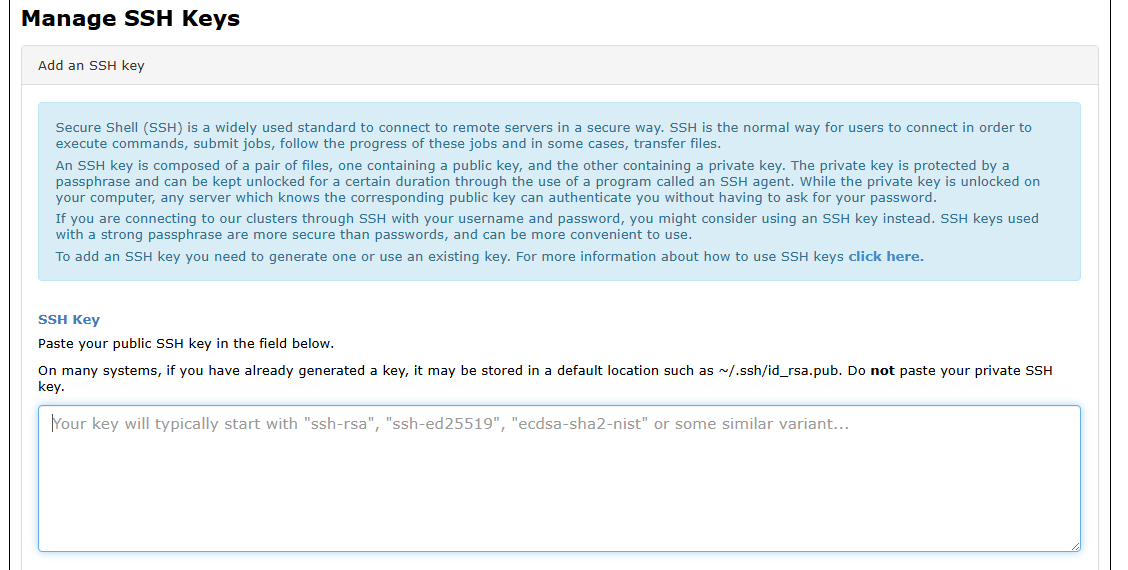
Important
DO NOT copy and paste your private key. Only copy the public key.
Add the following entry to your
~/.ssh/configfile:Host vulcan HostName vulcan.alliancecan.ca User <your_user_name> ControlPath ~/.ssh/cm-%r@%h:%p ControlMaster auto ControlPersist 60mLog in to
Vulcanusing:ssh <your_user_name>@vulcan
Windows#
Generate an SSH key pair:
ssh-keygen -t ed25519 -C "your_email@example.com"
Log in to the CCDB portal using your account credentials.
From the top drop-down menu, navigate to
My Account→SSH Keys.
Copy the contents of the public key file
C:\Users\<username>\.ssh\id_ed25519.pubinto the text box. You can open this file using Notepad.
Add the following entry to the file
C:\Users\<username>\.ssh\config(you can edit this file with Notepad):Host vulcan HostName vulcan.alliancecan.ca User <your_user_name>Log in to
Vulcanusing:ssh <your_user_name>@vulcan
Install a Python Environment#
At the moment, we are unable to provide a global uv install on the clusters due to technical issues.
As a workaround, uv can certainly be used but it must be installed within your home directory on the cluster using pipx.
Navigate to ~/ in your shell on the cluster and run:
pipx install uv
This installs uv into your home directory.
Unlike pip, which installs packages system-wide and may interfere with the system Python,
pipx installs each package into an isolated virtual environment under ~/.local/venvs.
This makes it a safe and recommended option for HPC users.
Once installed, you can use uv like usual, for example:
uv pipuv venv
Note
pipx is only available on Vulcan.