
Introduction to HPC#
To utilize cluster resources effectively, it is essential to understand the fundamentals of High-Performance Computing (HPC). Blindly copying and pasting scripts—whether generated by AI or shared by peers—often leads to inefficient resource usage, which can result in:
Longer queue wait times for you and the community.
Increased job execution times due to resource bottlenecks.
Reduced availability of shared hardware.
Lower overall cluster utilization.
Missed paper deadlines (a situation best avoided!).
By investing a small amount of time to learn these basics, you will significantly improve your workflow and save countless hours throughout your research journey.
Do not be intimidated by the term HPC. At its simplest, an HPC cluster is a collection of hundreds or thousands of individual computers (called nodes) interconnected via a high-speed network.
Each node is fundamentally similar to a high-end personal computer. If you connected multiple PCs together and installed a “Workload Manager” (like Slurm), you would have a basic cluster.
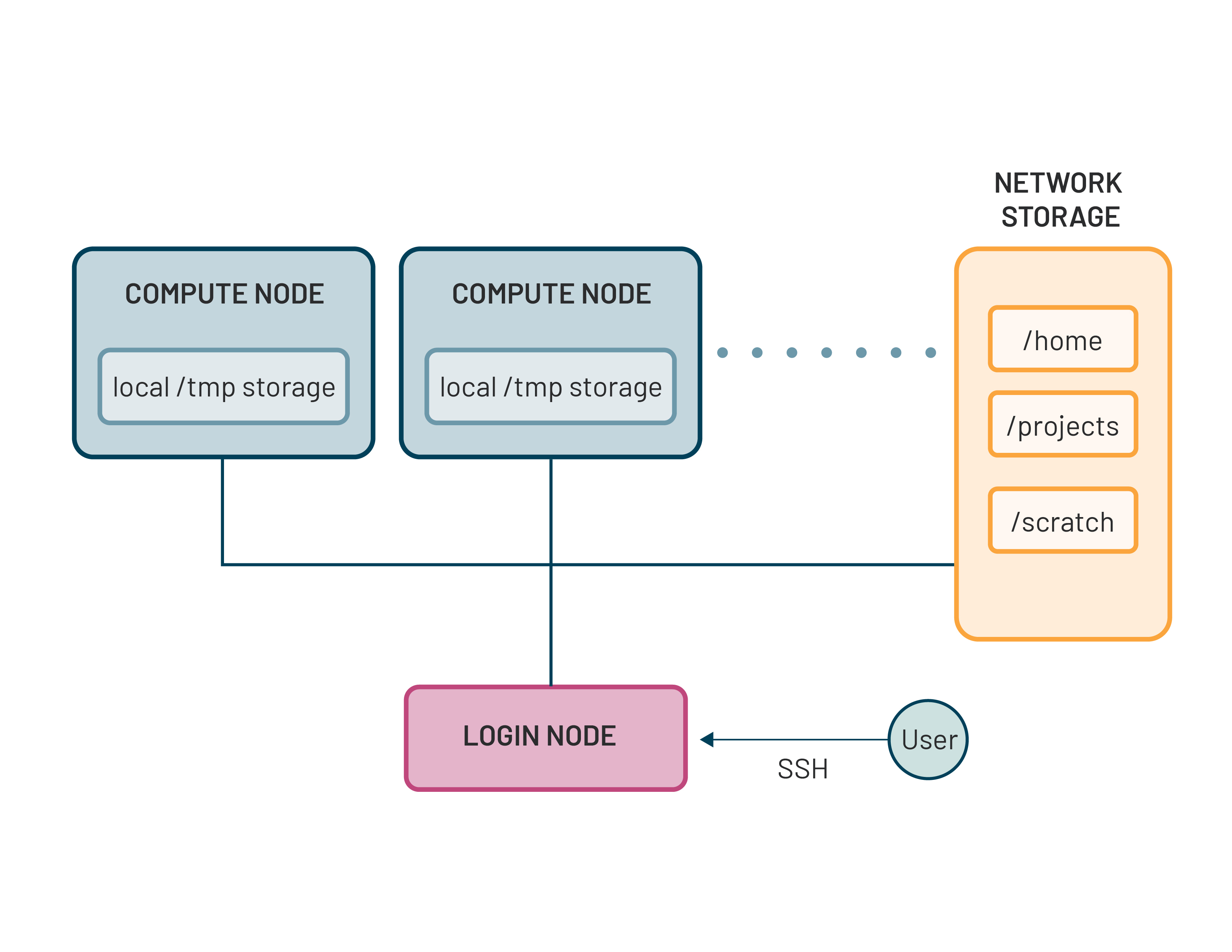
The picture below shows the conceptual architecture of an HPC cluster.
Login Nodes#
When you connect to the cluster via SSH, you land on a Login Node. This environment is designed for administrative tasks: managing files, editing source code, and submitting jobs to the scheduler.
Important
Never run heavy computations on a login node. Because these nodes are shared by all active users, running a resource-intensive script is like blocking the front door to a building. It slows down the entire system for everyone.
Compute Nodes#
These are the “workhorses” where your actual code executes. They are typically “headless” (no monitors or mice) to maximize efficiency and density. Clusters often categorize compute nodes by their hardware strengths:
CPU Nodes: Optimized for general logic, serial processing, and heavy mathematical throughput that is not matrix multiplications (e.g., most AI training).
GPU Nodes: Specialized for massive parallel tasks, such as AI/Deep Learning training or molecular dynamics simulations.
High-Memory Nodes: Designed for data-intensive tasks requiring hundreds of gigabytes (or terabytes) of RAM.
The Workload Manager#
Beyond physical hardware, the workload manager is the most critical software component of a high-performance cluster.
A workload manager (also known as a job scheduler) is a specialized system designed to orchestrate the shared use of a cluster’s computing resources. It acts as the “brain” of the cluster, ensuring that thousands of individual nodes function as a single, cohesive unit.
The manager performs several core functions:
Resource Allocation#
The manager maintains a real-time inventory of every available CPU core, GPU, and byte of RAM across the cluster. When you submit a job request, it ensures the specific resources you require are physically available and reserved exclusively for your use.
Job Scheduling#
When you submit a task, it enters a global queue. Rather than a simple “first-come, first-served” approach, the workload manager uses complex algorithms (often called Fair Share) to prioritize jobs. It balances several factors, including:
How long the job has been waiting in the queue.
The size of the request (number of nodes/GPUs).
Your recent resource usage compared to other users.
Execution & Reporting#
Once resources are available, the manager “launches” your script onto the assigned compute nodes. During execution, it:
Monitors the health and status of your job.
Enforces “Walltime” (terminating jobs that exceed their requested time limit to prevent hangs).
Logs detailed accounting data such as CPU cycles, peak memory, and energy consumption—for future optimization and reporting.
Most modern HPC clusters, including Vulcan, utilize Slurm.
Developed by SchedMD, now owned by Nvidia, Slurm is the industry-standard, open-source workload manager. It is currently widely used by world’s TOP500 supercomputers due to its massive scalability and efficiency.
In the next section, we will dive into practical Slurm usage to help you efficiently harness the full power of the Vulcan cluster!